Running an episode
An episode is one drive of up to 60 steps on one seed. It ends early if the ego crashes.
Seed and reset
The seed in the status strip sets the traffic. Type a number and press the reset button (the circular arrow next to it) to start a new episode on it. Reset discards the current episode, opens a new log file under backend/logs/runs/, cancels any open escalation, and keeps the rule list. The same seed always produces the same opening scene, which is what makes a shield on versus off comparison fair.
Step, play, speed
- "step" (N) advances exactly one step and returns control to you.
- "play" (Space) advances continuously at the selected speed: 0.5, 1, 2 or 4 steps per second. "pause" stops after the current step.
- An open escalation pauses the loop until it is resolved, whatever the speed.
Speed is a playback rate. The simulator itself takes one decision per simulated second regardless.
What one step does
- The policy ranks all five actions by Q-value: LANE_LEFT, IDLE, LANE_RIGHT, FASTER, SLOWER.
- Code turns the simulator state plus each candidate action into facts with units: ego speed and lane, the lane after the action, gaps and closing speeds in that lane, whether a slower vehicle is ahead, any zone ahead and whether the action enters it.
- Jev is asked, for each candidate and each enabled rule, whether executing that action would violate the rule. Cached answers are reused.
- The shield takes the top-ranked action's worst probability and allows, falls back or escalates (see Concepts).
- The chosen action executes in the simulator. The ground-truth checkers label every candidate for scoring.
- One record is logged and streamed to every connected console.
The whole step is one message on the wire, which is why replay and the inspector show exactly what the operator saw.
Shield on and off
The shield switch in the strip toggles the shield for subsequent steps; it reads "on" in cyan or "off". You can flip it mid-episode. The usual demo is: run a seed with the shield off, press reset, flip the shield on, run the same seed again.
Shield off still judges
With the shield off the top action always executes, but facts, Jev and the checkers still run in shadow. Decisions are logged as allowed, the violations counter still counts, and the step still costs the same Jev tokens. Before and after numbers come from the same code path.
Reading the road view
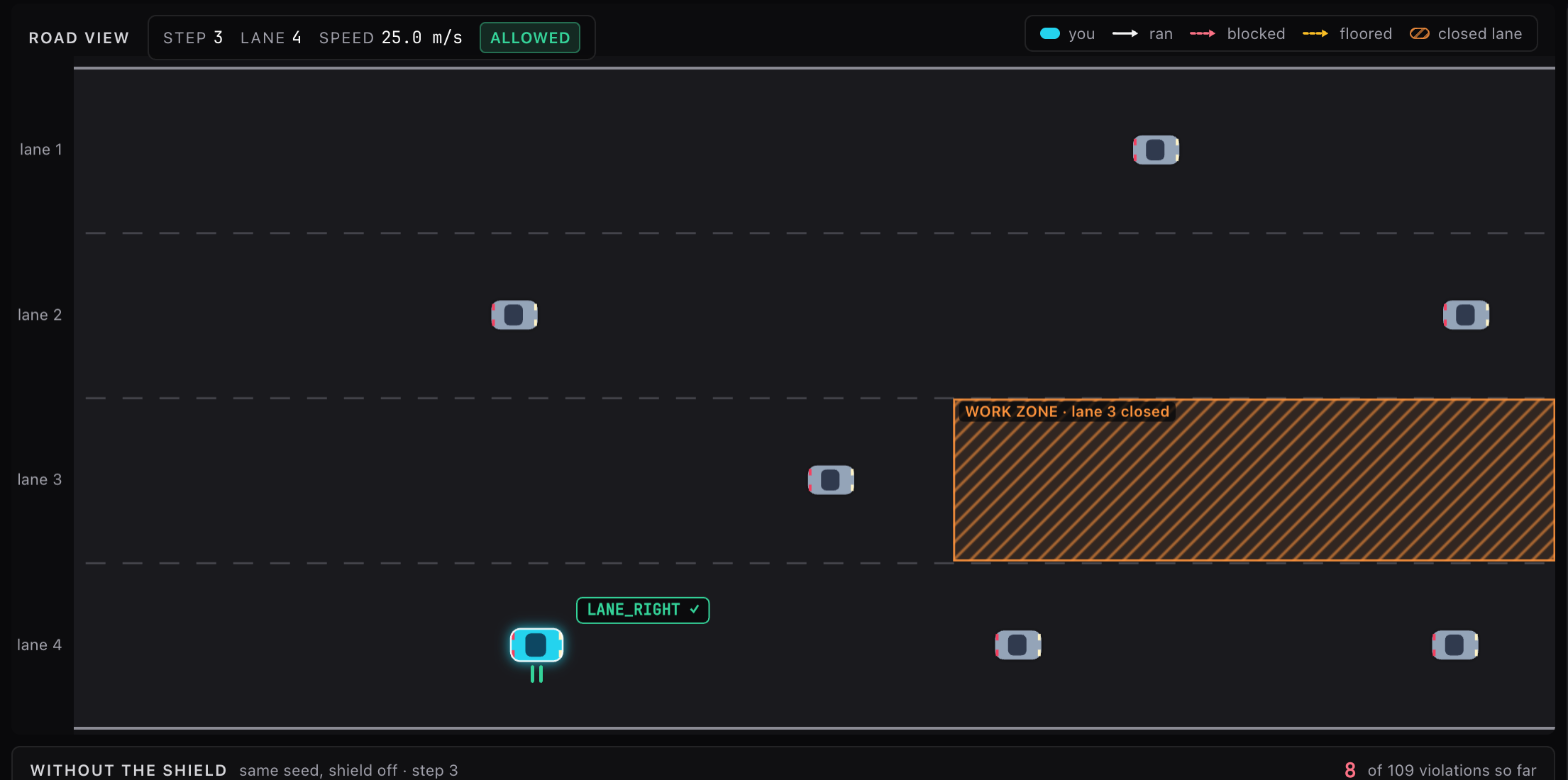
- Lanes are numbered from the left starting at 1, matching the facts and the rules. Lane labels sit in the gutter at the left, outside the road.
- Every car has headlights at its front (the right end) and taillights at its rear. The ego is cyan with a white outline and a glow; traffic is grey.
- The chip above and to the right of the ego names the policy's choice and what ran:
FASTER ✓when the policy's own choice executed,FASTER ✕ → IDLEwhen something else did. - A solid arrow from the ego shows the action that executed, colored by the decision: green allowed, amber fallback, violet escalated, rose all blocked. Left and right arrows are lane changes, a forward arrow is FASTER, a backward arrow is SLOWER. IDLE, or a lane change at the edge of the road that changes nothing, is drawn as two short bars under the car, a hold mark, in the same outcome color; the legend lists it as "hold".
- A dashed arrow is a ghost of the policy's top action when something else executed: rose when a rule blocked it, amber when the physics floor removed it. Seeing both at once is the shield intervening.
- A closed zone is a hatched orange stretch of one lane labeled with its name, for example
WORK ZONE · lane 3 closed. Zones are placed with the "drop work zone ahead" button, see Rules and zones. CRASHin rose beside the ego marks the step that ended the episode in a collision.- The HUD at the top left shows the step, lane and speed, the outcome badge with the blocked action if any, and the operator's answer when there was one. The legend at the bottom right names the colors and arrows.
The unshielded twin
Under the road view, when the seed has a shield-off log, a faded strip replays the unshielded run of the same seed in step with the live one. With the shield off the policy's top action always executes, so that run depends only on the seed and the checkpoint; it is the baseline the live run is being compared with, on screen. Its title counts the twin's violations so far beside the live run's, both against the rules you have on that carry a checker, and marks where it crashed. Reset to a seed without a log and the strip disappears. See Tour.
The decision badge
The status badge in the strip shows the latest step's outcome whenever nothing more urgent is going on. fallback → IDLE means the top action was confidently a violation and IDLE was the first lower-ranked action that was confidently safe. escalated → SLOWER means the operator denied and the fallback ran. allowed with no arrow means the policy's own choice ran. The same badge sits in the road view's HUD.
No compliant action
When no candidate at all is confidently safe, the shield does not pick for you. It escalates with the reason "no compliant action" and the approval queue lists every candidate so you can choose one; see Approval queue. A deny on such a card runs the least-bad candidate, the lower-ranked action with the lowest probability that is not a confident violation and would actually change something. Only when nothing qualifies does the shield fall back to SLOWER, or IDLE if SLOWER itself scores above the block threshold, and that step is marked all blocked. "All blocked" in rose on the timeline therefore only appears in logs from before this change; current runs show such steps as escalations.
The shield enforces rules, not collision safety
The policy's own crash avoidance is what keeps the car out of accidents. A deny or an all-blocked step can override a lane change the policy wanted for exactly that reason. This is why the hosted demo runs with no escalation timeout and why a following-distance rule is a sensible addition to the rule set.
When the episode ends
After step 60, or on a crash, the strip shows "episode over" and "step" and "play" grey out. Press reset for another episode, or pick the finished run in the source menu to walk through it again.